Integrations
Connect payment, shipping, invoicing and tracking tools to your store
Every integration works with your own account: you enter your keys in the dashboard and they are stored encrypted. Payments are paid out by the provider directly to your account.
- Connects to your own provider account
- Keys are stored encrypted
- Browser scripts load according to cookie choices
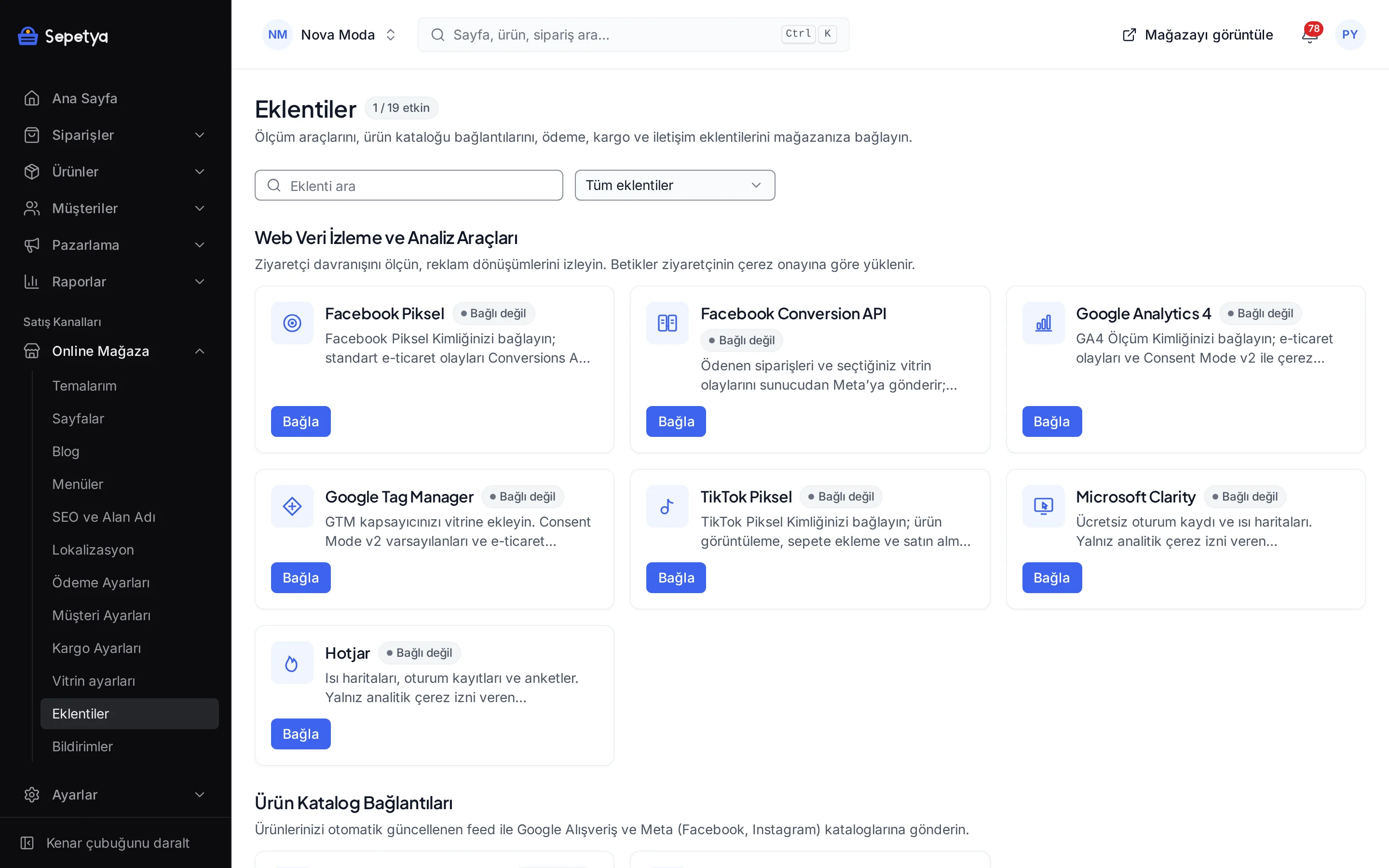
All integrations
Filter by category. Each integration’s page explains which fields to fill in the dashboard, what it does and what its limits are; modules that need a plan feature are marked in the list.
15 Integrationen
Zahlungen (6)
Kunden bezahlen per Banküberweisung auf Ihre Konten. Bestellungen bleiben auf „Zahlung ausstehend“, bis Sie die Überweisung bestätigen.
Kunden, die ihre Bestellung im Geschäft abholen, bezahlen bei der Abholung. Die Bestellung wird mit „Zahlung ausstehend“ aufgegeben; markieren Sie sie als bezahlt, wenn Sie die Zahlung erhalten.

iyzico
Abhängig von Ihrem Tarif
Akzeptieren Sie Karten- und Ratenzahlungen mit dem iyzico-Checkout-Formular. Kartendaten berühren Ihren Shop nie.
Kunden bezahlen bei Lieferung der Bestellung bar oder mit Karte. Bar- und Kartenzahlung werden in den Zahlungseinstellungen getrennt aktiviert oder deaktiviert (Karte nur, wenn Ihr Versanddienstleister ein Kartenterminal mitbringt); die Gebühr wird in der Regel der Zahlungsmethode festgelegt (Aufpreis / Rabatt).

PayTR
Abhängig von Ihrem Tarif
Akzeptieren Sie Karten- und Ratenzahlungen mit PayTR: in Ihrer Kasse (iFrame) oder auf der Zahlungsseite von PayTR.

Stripe
Abhängig von Ihrem Tarif
Internationale Karten und lokale Zahlungsmethoden mit Stripe Checkout: auf der Zahlungsseite von Stripe oder in Ihrer Kasse. Erfordert ein Unternehmen, das in einem von Stripe unterstützten Land registriert ist.


Versand (1)
Tracking-Links für Yurtiçi, Aras, DHL eCommerce (MNG), Sürat, PTT, UPS, DHL Express, HepsiJet, Kolay Gelsin, Trendyol Express und Sendeo, mit optionalen Pauschal- oder Gewichtsstaffeltarifen (nach Volumengewicht, wenn die Versandeinstellungen nach Desi abrechnen).

Analyse (2)

Google Analytics 4
Abhängig von Ihrem Tarif
Verbinden Sie Ihre GA4-Mess-ID: E-Commerce-Ereignisse und Messung mit Consent Mode v2, die der Cookie-Einwilligung folgt.

Google Tag Manager
Abhängig von Ihrem Tarif
Fügen Sie Ihren GTM-Container mit Consent-Mode-v2-Standardwerten und E-Commerce-dataLayer-Ereignissen zur Storefront hinzu.
Marketing (3)

Meta Conversions API
Abhängig von Ihrem Tarif
Sendet bezahlte Bestellungen und die von Ihnen gewählten Storefront-Ereignisse von Besuchern, die Marketing-Cookies erlaubt haben, vom Server an Meta: unbeeinflusst von Browser-Blockern und mit dem Pixel über gemeinsame Ereignis-IDs dedupliziert.

Meta Pixel
Abhängig von Ihrem Tarif
Verbinden Sie Ihre Meta-Pixel-ID; Standard-E-Commerce-Ereignisse tragen IDs, die mit der Conversions API dedupliziert werden.

TikTok Pixel
Abhängig von Ihrem Tarif
Verbinden Sie Ihre TikTok-Pixel-ID, um Ereignisse für Produktansicht, In den Warenkorb und Kauf zu senden.
Produkt-Feeds (2)
Automatisch aktualisierter Produkt-Feed (RSS 2.0), um Ihre Produkte in Google Shopping anzuzeigen. Die Feed-URL wird auf der App-Seite angezeigt.
Automatisch aktualisierter Produktkatalog (CSV oder XML) für Facebook- und Instagram-Shops und dynamische Anzeigen; optional erreichen Änderungen den Meta-Katalog innerhalb von Minuten.


Werkzeuge (1)
Zeigt eine schwebende WhatsApp-Schaltfläche, damit Kunden Ihnen mit einem vorausgefüllten Text schreiben können.

For developers
Need to connect a system that is not listed?
If you need to work with a system the dashboard does not cover, you have two options. With the REST API and webhooks you connect orders, products and customers to your own system; with the module SDK modules such as payment, shipping, e-invoicing, SMS, pixels and product feeds can be built.
There is no built-in marketplace or ERP integration; those are developed separately on top of the module SDK.
- A REST API described by an OpenAPI 3.1 document
- API keys with limited scopes and a request rate limit
- Webhooks signed with Standard Webhooks and retried on failure
- Modules are compiled with the platform; user-uploaded code is never run
Frequently asked questions about integrations
Do I need a separate contract with the provider?
Yes. Every integration works with your own provider account: you open and manage your iyzico, PayTR, Stripe, Nilvera, NetGSM, Google, Meta and TikTok accounts. Commissions, credit and usage fees depend on your contract with the provider; the platform is not a party to those accounts.
Are my keys and passwords safe?
Secret fields (API secrets, access tokens, passwords) are encrypted with AES-256-GCM in the database, masked in the dashboard and kept out of logs. Card numbers never reach the platform: they are entered on the payment providers’ own forms.
Which integrations are included in my plan?
The Apps page marks apps that are not part of your plan with the note “This app is not included in your current plan”, and you can upgrade your plan. Plan contents are listed in the comparison table on the pricing page.
Is there a marketplace or ERP integration?
There is no built-in marketplace (for example Trendyol or Hepsiburada) or ERP integration. Such connections can be built with the REST API and webhooks or developed separately on top of the module SDK. See the developers page for details.
What happens if my integration settings are wrong?
Keys are checked when you save and when the app is activated; iyzico and Stripe keys are tried against the provider and the formats of ids and IBANs are validated. Errors during operation appear on the app page as the last error and in the logs.
Try the integrations yourself
Set up your store during the trial and connect payment, shipping and tracking tools from the dashboard.